
You've probably been told that automation is the key to effortless hosting — but here's what nobody mentions: automate the wrong things first, and you'll automate yourself into lower bookings, worse reviews, and a reputation you can't fix. The question isn't whether to automate your Airbnb — it's knowing which systems deserve your trust, and which need your human touch.
This guide walks you through the smartest automation decisions for UK hosts in 2026: what to hand off immediately, what to monitor closely, and what you should never, ever automate. Whether you're managing one spare room or a small portfolio, these principles will save you time without costing you guest satisfaction.
Why Airbnb Automation Tools Matter More in 2026
The short-term rental landscape has shifted. Airbnb's algorithm now rewards consistency, responsiveness, and guest experience quality above almost everything else. Hosts who respond within minutes, maintain accurate calendars across platforms, and deliver seamless check-ins rank higher and convert more searches into bookings.
The problem? Doing all of this manually is exhausting. The solution isn't to automate everything blindly — it's to automate the repetitive, time-sensitive tasks that machines handle better than humans, whilst keeping your personal touch where it matters most: guest relationships, listing personality, and local expertise.
Airbnb automation software isn't about replacing you as a host. It's about freeing you from admin work so you can focus on the parts of hosting that actually drive bookings and five-star reviews. But choose poorly, and you'll automate yourself into mediocrity.
What to Automate First: The High-Impact, Low-Risk Areas
Start with the systems that save you the most time whilst carrying the least risk of damaging your guest experience. These are the automation tools that UK hosts consistently report as game-changers.
1. Automated Messaging for Standard Guest Communication
This is the single best place to start with Airbnb automation tools. Pre-booking enquiries, booking confirmations, check-in instructions, checkout reminders — these messages need to go out at predictable times with consistent information. Tools like Hospitable, TouchStay, and Your Porter excel here.
Set up templates for your most common messages, schedule them to send at optimal times (booking confirmation within 2 minutes, check-in details 24 hours before arrival), and personalise with merge fields like guest name and arrival date. You'll respond faster, guests get the information they need when they need it, and you're not chained to your phone.
Critical rule: Always review and approve the first message in any new conversation thread. Automation should handle the predictable follow-ups, not your first impression. For a deeper dive into which platforms offer the best messaging features for UK hosts, see our guide to the best tools for automating Airbnb guest communication in 2026.
2. Dynamic Pricing (With Human Oversight)
Manual pricing adjustments are time-consuming and often lag behind market changes. Dynamic pricing tools like PriceLabs, Wheelhouse, and Beyond analyse local demand, competitor rates, and seasonal trends to adjust your nightly rate automatically.
But here's the catch: no algorithm understands your property and local events like you do. Set floor and ceiling prices to protect your margins, review suggested changes weekly, and override the automation when you know something the software doesn't (a local festival, roadworks nearby, or a competing property going offline).
If you'd like an expert assessment of your current pricing strategy with specific suggestions to improve, LetGrow's free listing score shows you exactly where you stand against local competitors and whether your rate is leaving money on the table.
3. Calendar Synchronisation Across Platforms
If you're listed on Airbnb, Booking.com, and Vrbo, manual calendar updates are a recipe for double-bookings and cancellations (which destroy your search ranking). Channel managers like Guesty, Hostfully, and iGMS sync your availability automatically across all platforms.
This is low-risk automation — there's almost no downside to letting software handle availability syncing. Just ensure you're using iCal feeds correctly and test the sync after setup by making a test booking on one platform and confirming it blocks off the dates everywhere else within minutes.
4. Review Response Templates
Responding to every review quickly matters for your ranking, but writing bespoke replies to 50 five-star reviews saying 'Great host, spotless flat' is a waste of your time. Create 3-5 templates for common review types (glowing praise, constructive feedback, first-time guests) and customise them with a personal line or two.
Tools like Hostfully and TouchStay offer review response automation, but even a simple Google Doc with templates you can copy-paste will save you hours each month. The key is speed and consistency, not poetic originality.
What to Automate With Caution: The Medium-Risk Zone
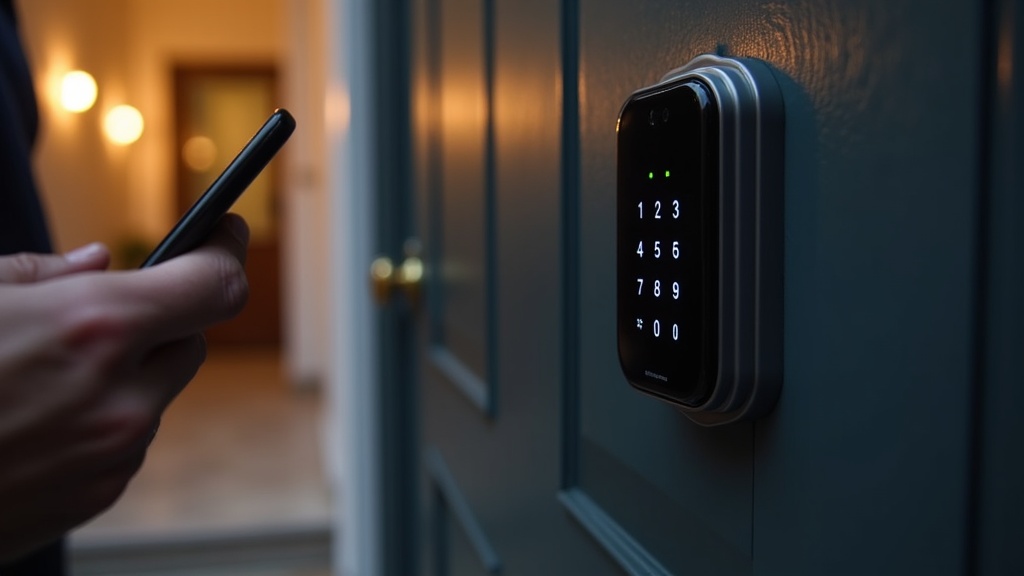
These areas benefit from automation, but they need your regular attention. Set them up, monitor closely, and be ready to intervene when the system gets it wrong.
5. Smart Locks and Self Check-In
Keyless entry via smart locks (Nuki, Yale, August) is convenient for you and guests, eliminates key handover logistics, and allows instant access at check-in time. But when the tech fails — and it will, occasionally — you need a backup plan.
Always have a physical key in a secure lockbox as a fallback. Always test your smart lock system after a firmware update. And always, always send check-in instructions via multiple channels (Airbnb message, email, SMS) with your phone number in case guests can't access the property.
6. Automated Upsells and Guidebooks
Digital guidebooks (Touch Stay, Hostfully, Enso Connect) can automatically send guests your house rules, local recommendations, and checkout instructions. Some platforms let you upsell add-ons like early check-in, late checkout, or hampers.
This works brilliantly for organised, detail-oriented guests — but some will ignore the guidebook entirely and message you anyway. Monitor your inbox for questions that your guidebook should have answered, then improve the guidebook based on actual guest behaviour. For a comprehensive resource you can tailor to your property, LetGrow's £9 digital guidebook template includes sections for house rules, local recommendations, and emergency contacts that you can customise and automate.
7. Cleaning and Maintenance Scheduling
Tools like Properly, Turno, and Breezeway automatically notify your cleaner when a guest checks out and schedule turnovers based on your booking calendar. This saves you from manually coordinating every clean and reduces the risk of a missed turnover.
The risk? If your cleaner is running late or finds damage, the system won't know unless someone updates it. Always confirm directly with your cleaner that the property is guest-ready before the next check-in. Automation handles the scheduling; you handle the quality control.
What You Should Never Automate: Keep These Human
Here's where hosts get themselves into trouble. Some aspects of hosting seem like they'd benefit from automation, but they're exactly where your personal touch makes you stand out from the algorithmic crowd.
8. Complex Guest Enquiries and Special Requests
When a guest asks whether your flat is suitable for a toddler, if there's step-free access, or whether they can check in two hours early because of a flight delay, you need to respond personally. Canned replies to these questions make you look robotic and often miss the nuance of what the guest is really asking.
Most quality Airbnb automation software will flag complex enquiries for manual review. If yours doesn't, you'll damage your conversion rate and reviews. Guests book with hosts who sound helpful and attentive — not with bots.
9. Problem Resolution and Complaints
This should be obvious, but some hosts still try to automate complaint responses with templated apologies. Don't. When something goes wrong — the heating fails, the WiFi drops out, a neighbour complains — your immediate, personal, solution-focused response is the difference between a bad review and a guest who appreciates how you handled the issue.
Always respond to complaints yourself, acknowledge the specific problem, explain what you're doing to fix it, and follow up to confirm it's resolved. This is where you earn your Superhost badge.
10. Listing Optimisation and Content Updates
Some platforms offer AI-generated listing descriptions and auto-updated amenity lists. Resist the temptation. Your listing title, description, and photos are your sales pitch — they need your personality, local knowledge, and strategic thinking.
Generic AI-written descriptions sound like every other listing in your area. Your unique selling points — the Victorian fireplace, the private garden, the two-minute walk to the Tube — need to be highlighted in a way that speaks to your ideal guest. For a professional eye on your listing with tailored suggestions to improve your title, photos, and amenities, LetGrow analyses your listing for free and shows you exactly what's holding back your bookings.
Want to understand whether full-service automation (or a management company) is right for your property, or whether strategic optimisation delivers better ROI? Read our pillar guide on Airbnb management vs listing optimisation to compare your options.
Best Airbnb Automation Tools for UK Hosts in 2026
Here's a practical breakdown of the tools UK hosts are using right now, organised by what they automate best. These aren't exhaustive reviews — just honest takes on what each platform does well and where it falls short.
For Messaging Automation
Hospitable (from £20/month): Excellent for small portfolios, integrates with Airbnb and Booking.com, solid template system, reliable scheduling. UK support is responsive.
Your Porter (from £10/month per listing): Great for solo hosts, simple interface, strong guest communication features. Lacks advanced pricing tools.
TouchStay (from £7/month per listing): Best-in-class digital guidebook with automated messaging. Brilliant for local recommendations and upsells.
For Dynamic Pricing
PriceLabs (from £19/month): Data-rich, integrates with most platforms, excellent customisation. Steep learning curve, but worth it for serious hosts.
Wheelhouse (from £20/month): User-friendly, good default settings, strong market data. Less granular control than PriceLabs.
Beyond Pricing (from £20/month): Set-it-and-forget-it simplicity, solid performance. Limited customisation options.
Not sure whether your current pricing strategy is competitive? Get your free Airbnb performance score and see how your rate compares to similar properties in your area — plus specific recommendations on weekend uplift, seasonal adjustments, and minimum stays.
For Channel Management
Guesty (from £40/month): Powerful, scales well, integrates with everything. Overkill for hosts with 1-3 properties.
Hostfully (from £20/month per property): Strong all-rounder, excellent guidebook features, reliable calendar sync. Pricing can add up for small portfolios.
iGMS (from £12/month per property): Budget-friendly, solid core features, good for hosts wanting basic automation without enterprise complexity.
For Self Check-In
Nuki Smart Lock (£230 hardware + £40/year subscription): Popular in the UK, reliable, integrates with most booking platforms. Requires a stable WiFi connection.
Yale Linus (£200 hardware): No subscription, easy DIY install, works offline. Fewer third-party integrations than Nuki.
The Biggest Mistakes UK Hosts Make With Airbnb Automation Software
1. Automating everything at once. Start with messaging and calendar sync. Add pricing and cleaning coordination once you're comfortable. Layer automation gradually so you can troubleshoot issues without chaos.
2. Setting it and forgetting it. Automation needs regular audits. Review your message templates quarterly, check your dynamic pricing weekly, and test your smart lock monthly. Systems drift out of sync if you don't monitor them.
3. Using templates that sound like templates. 'Dear [Guest Name], we hope you enjoy your stay!' is robotic. Rewrite your automated messages in your natural voice. Use contractions. Sound like a human.
4. Letting pricing automation override common sense. If a tool suggests £300/night during a local marathon when you know the area will be gridlocked, override it. Algorithms don't read the local news.
5. Automating without testing. Every new automation should be tested with a dummy booking or a test message before you trust it with real guests. Check how it behaves when things go wrong (late checkout, booking changes, cancellations).
How to Build Your Airbnb Automation Stack: A Practical Roadmap
Month 1: Set up automated messaging for booking confirmations, check-in instructions, and checkout reminders. Start with 3-5 core templates and personalise them with merge fields. Test with a friend or family member before rolling out to real guests.
Month 2: Add calendar synchronisation if you're on multiple platforms. Test thoroughly by making dummy bookings and confirming they block availability everywhere. Monitor for sync delays or errors for at least two weeks.
Month 3: Implement dynamic pricing with conservative floor/ceiling limits. Monitor suggested changes daily for the first two weeks, then weekly once you trust the system. Adjust your base rate manually for local events the algorithm doesn't know about.
Month 4: Layer in cleaning and maintenance scheduling if you have reliable service providers. Confirm directly with your cleaner after each turnover until you're confident the system is working smoothly.
Month 5: Consider smart locks if you're spending significant time coordinating key handovers. Install, test extensively, and always maintain a physical key backup. Update your check-in instructions to include troubleshooting steps.
Month 6: Refine, audit, and optimise. Review your automation performance: Are guests responding well? Are you saving time? Are there new bottlenecks? Tweak templates, adjust pricing rules, and retire anything that isn't working.
For a broader comparison of which tools make sense at different price points, see our guide to affordable Airbnb automation for small UK hosts.
Frequently Asked Questions
What is the best Airbnb automation tool for beginners?
For solo hosts managing 1-3 properties, start with Hospitable or Your Porter for messaging automation. Both offer intuitive interfaces, affordable pricing (under £25/month), and integrate seamlessly with Airbnb. They handle the most time-consuming task — guest communication — without overwhelming you with features you don't need yet.
Can I automate my Airbnb pricing for free?
Airbnb's built-in Smart Pricing is free but notoriously conservative and often underprices your property. Free trials of PriceLabs, Wheelhouse, and Beyond Pricing give you 7-14 days to test professional dynamic pricing tools. For long-term free options, you'll need to adjust prices manually based on market research — time-consuming but doable for hosts with one property.
Is automation allowed under Airbnb's terms of service?
Yes. Airbnb explicitly supports automation for messaging, pricing, and calendar management through its API and official integrations. What's not allowed: bots that scrape competitor data against platform rules, automated booking requests (rare for hosts), or tools that violate guest privacy. Stick with reputable, Airbnb-approved software and you'll be fine.
How much time does Airbnb automation actually save?
UK hosts report saving 5-10 hours per week per property after implementing messaging automation, dynamic pricing, and calendar sync. The biggest time savings come from eliminating repetitive admin work (sending check-in instructions, updating calendars, coordinating cleaners) rather than reducing total workload. You'll still need to handle guest issues, maintain the property, and update your listing — automation just removes the busywork.
Should I use Airbnb automation tools if I only have one property?
Absolutely. Even with one property, automated messaging improves your response time (which boosts your search ranking), dynamic pricing captures demand you'd otherwise miss, and calendar sync prevents double-bookings if you're listed on multiple platforms. Start small — messaging and pricing — and you'll reclaim hours every week without sacrificing guest experience.
What's the difference between automation tools and property management companies?
Automation tools handle specific tasks (messaging, pricing, calendar sync) but leave you in control of your listing and guest relationships. Property management companies take over end-to-end operations (cleaning, maintenance, guest support, listing optimisation) in exchange for 15-30% of your revenue. If you want to self-manage but need efficiency, automation tools are the answer. If you want to be hands-off, a management company might make sense. For a detailed breakdown of when each option makes financial sense, read our guide on Airbnb management vs listing optimisation.
Final Thoughts: Automate Smart, Not Everything
The hosts who succeed with Airbnb automation tools are the ones who understand this: automation amplifies what you're already doing well, but it won't fix a poorly optimised listing, weak photos, or uncompetitive pricing. Get your fundamentals right first — your title, description, amenities, and pricing strategy — then layer in automation to scale your efficiency.
Start with high-impact, low-risk systems: messaging, calendar sync, and dynamic pricing. Monitor everything closely for the first few weeks. Keep your personal touch where it matters most: complex enquiries, problem resolution, and the unique personality of your listing.
Ready to see how your listing measures up before you invest in automation? Get your free Airbnb performance score at LetGrow — we'll analyse your title, photos, pricing, and amenities, then show you exactly what's holding back your bookings and how to fix it.